确定需求
DLsite是全球最大的同人贩卖网站,里面包括漫画、音声、动画、游戏等等来自不同国家不同地区不同语言以及不同形式的二次元创作作品,这个项目暂定是爬取home下的所有漫画信息作为统计数据,链接为:
https://www.dlsite.com/home/works/comic
上万数据量的爬取,首选的框架肯定是异步的scrapy,速度非常快,非常适合庞大数据量的抓取
使用scrapy startproject test_rj和scrapy genspider rj_test来得到一个项目,设置好setting和start_urls之后就可以正式开始了
首先是定位,前期尝试中,无论是bs4定位还是xpath定位都无效,才发现第一次get返回的html与实际F12中标签元素有差别,于是这里不上F12控制台,毕竟所有信息都在第一次get请求之后就返回了,无需解析js或者json拿取数据,而且这个站点在反爬方面还是比较松的,实践中可以不需要携带User-Again,甚至默认带上Scrapy标签也行,几秒钟内请求上百次也不会封锁ip,但为了保险起见,上万数据量的爬取必定需要伪装手段为本机做点保护手段
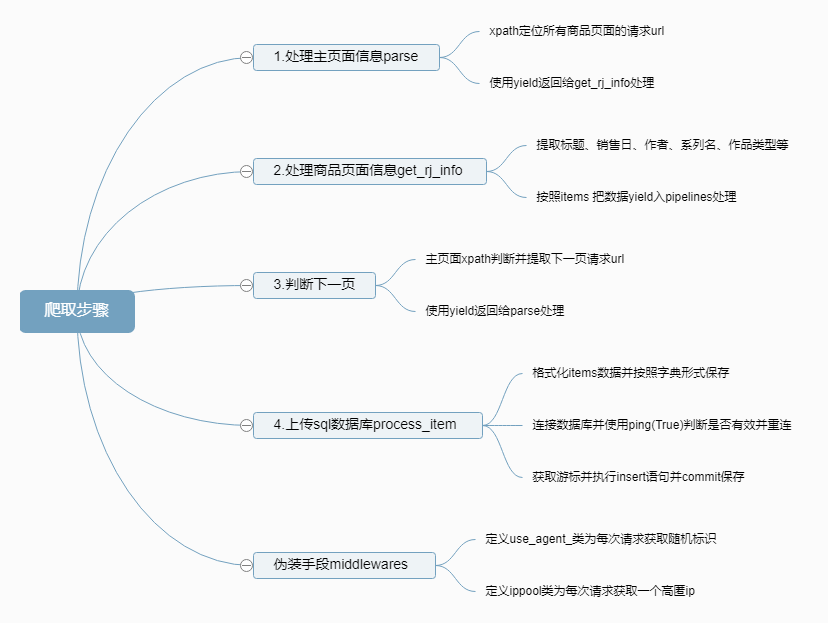
大致思路
代码
Scrapy项目结构:
E:.
│  .gitignore
│  scrapy.cfg
│
├─log
│      scrapy.log
│
├─python_uav
│      .gitignore
│
└─test_rj
    │  items.py
    │  main.py
    │  middlewares.py
    │  pipelines.py
    │  settings.py
    │  __init__.py
    │
    ├─spiders
    │  │  rj_test.py
    │  │  __init__.py
    │  │
    │  └─__pycache__
    │          rj_test.cpython-37.pyc
    │          __init__.cpython-37.pyc
    │
    └─__pycache__
            items.cpython-37.pyc
            middlewares.cpython-37.pyc
            pipelines.cpython-37.pyc
            settings.cpython-37.pyc
            __init__.cpython-37.pyc
首先在items.py中定义爬取的数据:
# Define here the models for your scraped items
#
# See documentation in:
# https://docs.scrapy.org/en/latest/topics/items.html
import scrapy
class TestRjItem(scrapy.Item):
    # define the fields for your item here like:
    # name = scrapy.Field()
    title = scrapy.Field()
    circle = scrapy.Field()
    ID = scrapy.Field()
    data = scrapy.Field()
    sname = scrapy.Field()
    keyword_creater = scrapy.Field()
    GEN = scrapy.Field()
    type_ =scrapy.Field()
    category = scrapy.Field()
    other = scrapy.Field()
    pages = scrapy.Field()
    genre = scrapy.Field()
    file_ = scrapy.Field()
    event = scrapy.Field()
然后在spiders.rj_test.py中:
import scrapy
from test_rj.items import TestRjItem
import logging
class RjTestSpider(scrapy.Spider):
    name = 'rj_test'
    allowed_domains = ['dlsite.com']
    start_urls = ['https://www.dlsite.com/home/works/comic']
    def parse(self, response):
        logging.debug(response.request.headers)
        url_list = response.xpath('//a[@class="work_thumb_inner"]/@href')
        for i in url_list:
            rj_url = i.extract()
            yield scrapy.Request(url=rj_url,callback=self.get_rj_info)
        next_page = response.xpath('//td[@class="page_no"]/ul/li[8]/a/@href').extract_first()
        if next_page:
            yield scrapy.Request(url=next_page,callback=self.parse)
    def get_rj_info(self,response):
        logging.debug(response.request.headers)
        def span_info(i):
            info_str = i.xpath('./td//span/text()').extract()
            len_ = len(info_str)
            if len_ == 1:
                return info_str[0]
            elif len_ == 0:
                return '无'
            else:
                return info_str
        def div_a_info(i):
            info_str = i.xpath('./td/div/a/text()').extract()
            len_ = len(info_str)
            if len_ == 1:
                return info_str[0]
            elif len_ == 0:
                return '无'
            else:
                return info_str
        def a_info(i):
            info_str = i.xpath('./td/a/text()').extract()
            len_ = len(info_str)
            if len_ == 1:
                return info_str[0]
            elif len_ == 0:
                return '无'
            else:
                return info_str
        def td_info(i):
            info_str = i.xpath('./td/text()').extract()
            len_ = len(info_str)
            if len_ == 1:
                return info_str[0]
            elif len_ == 0:
                return '无'
            else:
                return info_str
        def div_info(i):
            info_str = i.xpath('./td/div/text()').extract()
            len_ = len(info_str)
            if len_ == 1:
                return info_str[0]
            elif len_ == 0:
                return '无'
            else:
                return info_str
        def span_a_info(i):
            info_str = i.xpath('./td/span/a/text()').extract()
            len_ = len(info_str)
            if len_ == 1:
                return info_str[0]
            elif len_ == 0:
                return '无'
            else:
                return info_str
        rj = TestRjItem()
        title = response.xpath('//h1[@id="work_name"]/a/text()').extract_first()
        rj_id = response.xpath('//div[@id="work_left"]/div/@data-product-id').extract_first()
        maker = response.xpath('//span[@itemprop="brand"]/a/text()').extract_first()
        rj["title"] = title
        rj["circle"] = maker
        rj["ID"] = rj_id
        info = response.xpath('//table[@id="work_outline"]/tr')
        for i in info:
            info_name = i.xpath('./th/text()').extract_first()
            if info_name == '贩卖日':
                rj["data"]  = a_info(i)
            elif info_name == '系列名':
                rj["sname"] = a_info(i)
            elif info_name == '作者':
                rj["keyword_creater"] = a_info(i)
            elif info_name == '年龄指定':
                rj["GEN"] = span_info(i)
            elif info_name == '作品类型':
                rj["category"] = span_info(i)
            elif info_name == '文件形式':
                rj["type_"] = span_info(i)
            elif info_name == '其他':
                rj["other"] = span_info(i)
            elif info_name == '页数':
                rj["pages"] = td_info(i)
            elif info_name == '分类':
                rj["genre"] = div_a_info(i)
            elif info_name == '文件容量':
                rj["file_"] = div_info(i)
            elif info_name == '活动':
                rj["event"] = span_a_info(i)
        yield rj
之后是将获得的数据进行持久化储存的pipelines.py:
# Define your item pipelines here
#
# Don't forget to add your pipeline to the ITEM_PIPELINES setting
# See: https://docs.scrapy.org/en/latest/topics/item-pipeline.html
# useful for handling different item types with a single interface
from itemadapter import ItemAdapter
import MySQLdb
import logging
class TestRjPipeline:
    def __init__(self):
        host = ('localhost')
        user = ('root')
        pass_ = ('123456')
        db = ('sqlforpy')
        self.connect = MySQLdb.connect(host,user,pass_,db,charset='utf8mb4')
        self.cursor = self.connect.cursor()
    def process_item(self, item, spider):
        def get_data(items_):
            data = dict(items_)
            rj={'ID':'无','title':'无','circle':'无','keyword_creater':'无','data':'无','sname':'无'\
                ,'GEN':'无','type_':'无','category':'无','other':'无','pages':'无','genre':'无',\
                    'file_':'无','event':'无'}
            for k in data.items():
                rj[k[0]] = k[1]
            return rj
        rj = get_data(item)
        self.connect.ping(True)
        sql = r"""insert into dlsite_cg_copy1(RJ,标题,社团,作者,发售日,系列名,年龄指定,文件形式,作品类型,其他,页数,分类,文件容量,活动)VALUES("%s","%s","%s","%s","%s","%s","%s","%s","%s","%s","%s","%s","%s","%s")"""% (rj['ID'],rj['title'],rj['circle'],rj['keyword_creater'],rj['data'],rj['sname'],rj['GEN'],rj['type_'],rj['category'],rj['other'],rj['pages'],rj['genre'],rj['file_'],rj['event'])
        try:
            self.cursor.execute(sql)
            self.connect.commit()
        except:
            logging.debug('%s写入数据库出现错误!'%rj['ID'])
            logging.debug('内容为:\n{}\n'.format(rj))
            self.connect.rollback()
        logging.debug('此次保存操作结束')
    def close_spider(self, spider):
        self.cursor.close()
        self.connect.close()
之后再middlewares.py中定义伪装:
# Define here the models for your spider middleware
#
# See documentation in:
# https://docs.scrapy.org/en/latest/topics/spider-middleware.html
from scrapy import signals
import random
import requests
import logging
# useful for handling different item types with a single interface
from itemadapter import is_item, ItemAdapter
class use_agent_(object):
    def process_request(self,request,spider):
        user_agent_list=[
        'Mozilla/5.0 (Windows NT 10.0; Win64; x64) AppleWebKit/537.36 (KHTML, like Gecko) Chrome/85.0.4183.15 Safari/537.36 Edg/85.0.564.8'
        "Mozilla/5.0 (Windows NT 6.1; WOW64) AppleWebKit/537.36 (KHTML, like Gecko) Chrome/39.0.2171.95 Safari/537.36 OPR/26.0.1656.60",
        "Opera/8.0 (Windows NT 5.1; U; en)",
        "Mozilla/5.0 (Windows NT 5.1; U; en; rv:1.8.1) Gecko/20061208 Firefox/2.0.0 Opera 9.50",
        "Mozilla/4.0 (compatible; MSIE 6.0; Windows NT 5.1; en) Opera 9.50",

        "Mozilla/5.0 (Windows NT 6.1; WOW64; rv:34.0) Gecko/20100101 Firefox/34.0",
        "Mozilla/5.0 (X11; U; Linux x86_64; zh-CN; rv:1.9.2.10) Gecko/20100922 Ubuntu/10.10 (maverick) Firefox/3.6.10",

        "Mozilla/5.0 (Windows NT 6.1; WOW64) AppleWebKit/534.57.2 (KHTML, like Gecko) Version/5.1.7 Safari/534.57.2",

        "Mozilla/5.0 (Windows NT 6.1; WOW64) AppleWebKit/537.36 (KHTML, like Gecko) Chrome/39.0.2171.71 Safari/537.36",
        "Mozilla/5.0 (X11; Linux x86_64) AppleWebKit/537.11 (KHTML, like Gecko) Chrome/23.0.1271.64 Safari/537.11",
        "Mozilla/5.0 (Windows; U; Windows NT 6.1; en-US) AppleWebKit/534.16 (KHTML, like Gecko) Chrome/10.0.648.133 Safari/534.16",

        "Mozilla/5.0 (Windows NT 6.1; WOW64) AppleWebKit/537.36 (KHTML, like Gecko) Chrome/30.0.1599.101 Safari/537.36",
        "Mozilla/5.0 (Windows NT 6.1; WOW64; Trident/7.0; rv:11.0) like Gecko",

        "Mozilla/5.0 (Windows NT 6.1; WOW64) AppleWebKit/536.11 (KHTML, like Gecko) Chrome/20.0.1132.11 TaoBrowser/2.0 Safari/536.11",

        "Mozilla/5.0 (Windows NT 6.1; WOW64) AppleWebKit/537.1 (KHTML, like Gecko) Chrome/21.0.1180.71 Safari/537.1 LBBROWSER",
        "Mozilla/5.0 (compatible; MSIE 9.0; Windows NT 6.1; WOW64; Trident/5.0; SLCC2; .NET CLR 2.0.50727; .NET CLR 3.5.30729; .NET CLR 3.0.30729; Media Center PC 6.0; .NET4.0C; .NET4.0E; LBBROWSER)",
        "Mozilla/4.0 (compatible; MSIE 6.0; Windows NT 5.1; SV1; QQDownload 732; .NET4.0C; .NET4.0E; LBBROWSER)",

        "Mozilla/5.0 (compatible; MSIE 9.0; Windows NT 6.1; WOW64; Trident/5.0; SLCC2; .NET CLR 2.0.50727; .NET CLR 3.5.30729; .NET CLR 3.0.30729; Media Center PC 6.0; .NET4.0C; .NET4.0E; QQBrowser/7.0.3698.400)",
        "Mozilla/4.0 (compatible; MSIE 6.0; Windows NT 5.1; SV1; QQDownload 732; .NET4.0C; .NET4.0E)",

        "Mozilla/5.0 (Windows NT 5.1) AppleWebKit/535.11 (KHTML, like Gecko) Chrome/17.0.963.84 Safari/535.11 SE 2.X MetaSr 1.0",
        "Mozilla/4.0 (compatible; MSIE 7.0; Windows NT 5.1; Trident/4.0; SV1; QQDownload 732; .NET4.0C; .NET4.0E; SE 2.X MetaSr 1.0)",

        "Mozilla/5.0 (Windows NT 6.1; WOW64) AppleWebKit/537.36 (KHTML, like Gecko) Maxthon/4.4.3.4000 Chrome/30.0.1599.101 Safari/537.36",

        "Mozilla/5.0 (Windows NT 6.1; WOW64) AppleWebKit/537.36 (KHTML, like Gecko) Chrome/38.0.2125.122 UBrowser/4.0.3214.0 Safari/537.36"
        ]
        agent = random.choice(user_agent_list)
        request.headers['User_Agent'] = agent
class TestRjSpiderMiddleware:
    # Not all methods need to be defined. If a method is not defined,
    # scrapy acts as if the spider middleware does not modify the
    # passed objects.
    @classmethod
    def from_crawler(cls, crawler):
        # This method is used by Scrapy to create your spiders.
        s = cls()
        crawler.signals.connect(s.spider_opened, signal=signals.spider_opened)
        return s
    def process_spider_input(self, response, spider):
        # Called for each response that goes through the spider
        # middleware and into the spider.
        # Should return None or raise an exception.
        return None
    def process_spider_output(self, response, result, spider):
        # Called with the results returned from the Spider, after
        # it has processed the response.
        # Must return an iterable of Request, or item objects.
        for i in result:
            yield i
    def process_spider_exception(self, response, exception, spider):
        # Called when a spider or process_spider_input() method
        # (from other spider middleware) raises an exception.
        # Should return either None or an iterable of Request or item objects.
        pass
    def process_start_requests(self, start_requests, spider):
        # Called with the start requests of the spider, and works
        # similarly to the process_spider_output() method, except
        # that it doesn’t have a response associated.
        # Must return only requests (not items).
        for r in start_requests:
            yield r
    def spider_opened(self, spider):
        spider.logger.info('Spider opened: %s' % spider.name)
class TestRjDownloaderMiddleware:
    # Not all methods need to be defined. If a method is not defined,
    # scrapy acts as if the downloader middleware does not modify the
    # passed objects.
    @classmethod
    def from_crawler(cls, crawler):
        # This method is used by Scrapy to create your spiders.
        s = cls()
        crawler.signals.connect(s.spider_opened, signal=signals.spider_opened)
        return s
    def process_request(self, request, spider):
        # Called for each request that goes through the downloader
        # middleware.
        # Must either:
        # - return None: continue processing this request
        # - or return a Response object
        # - or return a Request object
        # - or raise IgnoreRequest: process_exception() methods of
        #   installed downloader middleware will be called
        return None
    def process_response(self, request, response, spider):
        # Called with the response returned from the downloader.
        # Must either;
        # - return a Response object
        # - return a Request object
        # - or raise IgnoreRequest
        return response
    def process_exception(self, request, exception, spider):
        # Called when a download handler or a process_request()
        # (from other downloader middleware) raises an exception.
        # Must either:
        # - return None: continue processing this exception
        # - return a Response object: stops process_exception() chain
        # - return a Request object: stops process_exception() chain
        pass
    def spider_opened(self, spider):
        spider.logger.info('Spider opened: %s' % spider.name)
class ippool(object):
    def __init__(self):
        self.proxy_url = 'proxy_url'
    def get_proxy(self):
        try:
            response = requests.get(self.proxy_url)
            if response.status_code == 200:
                p = response.text.strip()
                logging.debug(p)
                ip = {"http":"http://"+p,"https":"https://"+p}
                r = requests.get("https://www.baidu.com",proxies=ip,timeout=4)
                if r.status_code == 200:
                    return p
        except:
            logging.debug('get proxy again ...')
            return self.get_proxy()

    def process_request(self,request,spider):
        proxy = self.get_proxy()
        if proxy:
            logging.debug("====="+'使用代理:'+proxy+"=====")
            request.meta['proxy'] = 'https://{}'.format(proxy)
    def process_response(self,request,response,spider):
        if response.status != 200:
            logging.debug('再次请求:')
            request.meta['proxy'] = 'https://{}'.format(self.get_proxy())
            return request
        return response
最后就是setting.py:
# Scrapy settings for test_rj project
#
# For simplicity, this file contains only settings considered important or
# commonly used. You can find more settings consulting the documentation:
#
#     https://docs.scrapy.org/en/latest/topics/settings.html
#     https://docs.scrapy.org/en/latest/topics/downloader-middleware.html
#     https://docs.scrapy.org/en/latest/topics/spider-middleware.html
BOT_NAME = 'test_rj'
SPIDER_MODULES = ['test_rj.spiders']
NEWSPIDER_MODULE = 'test_rj.spiders'
# Crawl responsibly by identifying yourself (and your website) on the user-agent
#USER_AGENT = 'test_rj (+http://www.yourdomain.com)'
# Obey robots.txt rules
ROBOTSTXT_OBEY = False
# Configure maximum concurrent requests performed by Scrapy (default: 16)
#CONCURRENT_REQUESTS = 32
# Configure a delay for requests for the same website (default: 0)
# See https://docs.scrapy.org/en/latest/topics/settings.html#download-delay
# See also autothrottle settings and docs
#DOWNLOAD_DELAY = 3
# The download delay setting will honor only one of:
#CONCURRENT_REQUESTS_PER_DOMAIN = 16
#CONCURRENT_REQUESTS_PER_IP = 16
# Disable cookies (enabled by default)
#COOKIES_ENABLED = False
# Disable Telnet Console (enabled by default)
#TELNETCONSOLE_ENABLED = False
# Override the default request headers:
DEFAULT_REQUEST_HEADERS = {
  'Accept': 'text/html,application/xhtml+xml,application/xml;q=0.9,*/*;q=0.8',
  'Accept-Language': 'zh-CN,zh;q=0.9,en;q=0.8,en-GB;q=0.7,en-US;q=0.6',
  'user-agent': 'Mozilla/5.0 (Windows NT 10.0; Win64; x64) AppleWebKit/537.36 (KHTML, like Gecko) Chrome/85.0.4183.15 Safari/537.36 Edg/85.0.564.8'
}
# Enable or disable spider middlewares
# See https://docs.scrapy.org/en/latest/topics/spider-middleware.html
#SPIDER_MIDDLEWARES = {
#    'test_rj.middlewares.TestRjSpiderMiddleware': 543,
#}
# Enable or disable downloader middlewares
# See https://docs.scrapy.org/en/latest/topics/downloader-middleware.html
DOWNLOADER_MIDDLEWARES = {
    #'test_rj.middlewares.TestRjDownloaderMiddleware': 543,
    'test_rj.middlewares.use_agent_':300,
    'test_rj.middlewares.ippool':301,
}
# Enable or disable extensions
# See https://docs.scrapy.org/en/latest/topics/extensions.html
#EXTENSIONS = {
#    'scrapy.extensions.telnet.TelnetConsole': None,
#}
# Configure item pipelines
# See https://docs.scrapy.org/en/latest/topics/item-pipeline.html
ITEM_PIPELINES = {
    'test_rj.pipelines.TestRjPipeline': 300,
}
# Enable and configure the AutoThrottle extension (disabled by default)
# See https://docs.scrapy.org/en/latest/topics/autothrottle.html
#AUTOTHROTTLE_ENABLED = True
# The initial download delay
#AUTOTHROTTLE_START_DELAY = 5
# The maximum download delay to be set in case of high latencies
#AUTOTHROTTLE_MAX_DELAY = 60
# The average number of requests Scrapy should be sending in parallel to
# each remote server
#AUTOTHROTTLE_TARGET_CONCURRENCY = 1.0
# Enable showing throttling stats for every response received:
#AUTOTHROTTLE_DEBUG = False
# Enable and configure HTTP caching (disabled by default)
# See https://docs.scrapy.org/en/latest/topics/downloader-middleware.html#httpcache-middleware-settings
#HTTPCACHE_ENABLED = True
#HTTPCACHE_EXPIRATION_SECS = 0
#HTTPCACHE_DIR = 'httpcache'
#HTTPCACHE_IGNORE_HTTP_CODES = []
#HTTPCACHE_STORAGE = 'scrapy.extensions.httpcache.FilesystemCacheStorage'
LOG_LEVEL = 'DEBUG'
log_file_path = ('log/scrapy.log')
LOG_FILE = log_file_path
为了方便执行,再写一个main.py作为执行文件
from scrapy import cmdline
cmdline.execute("scrapy crawl rj_test".split())
log中的效果
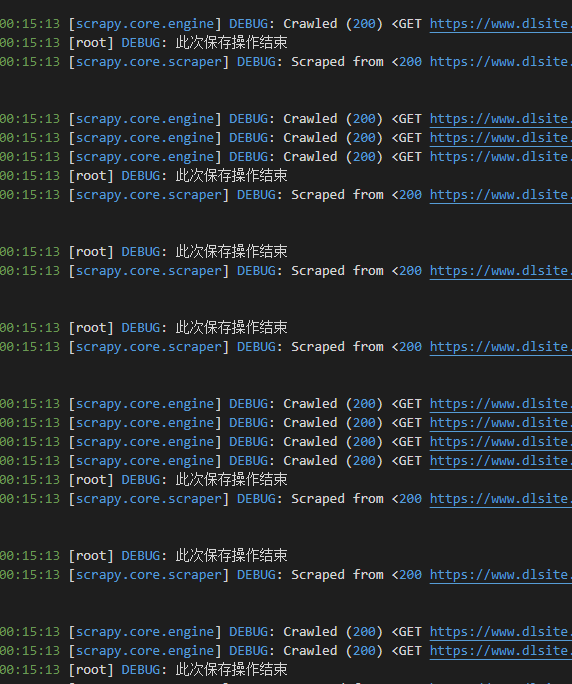
由于用上了代理,速度肯定会慢上不少,但是速度还是可以的,大概15秒有100次请求和保存那样